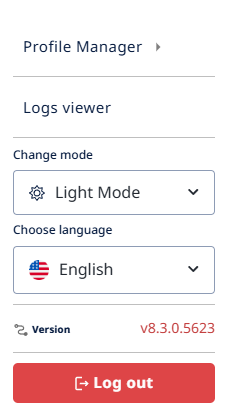
The user menu
The user menu lives at the top-right of the Application Bar, behind your avatar or initials. It gives you access to personal settings and the log-out option.
What's in the menu:
- Profile Manager — view and edit your personal information or password (password change only available for local accounts; SSO users change passwords through their identity provider). If you belong to more than one user group in the current project, you can also switch between them here — changing which group's permissions you're currently acting under.
- Logs viewer — open the Visure logs to review recent user actions, errors, and system events. Useful for auditing project activity, retracing your own actions, or troubleshooting unexpected behavior.
- Change mode — switch between Light Mode and Dark Mode.
- Choose language — change the interface language without signing out.
- Version — shows the current Visure version number (e.g.
v8.3.0.5623) at the bottom of the menu. Click for more detail; useful when contacting support. - Log out — end your session (the red button at the bottom of the menu).
The user menu is consistent across the entire application — you can access it from any view.