Copy an item (with or without links)
You can create a new item by copying an existing one. The copy carries the same name, description, attribute values, and (optionally) traceability links.
To copy an item:
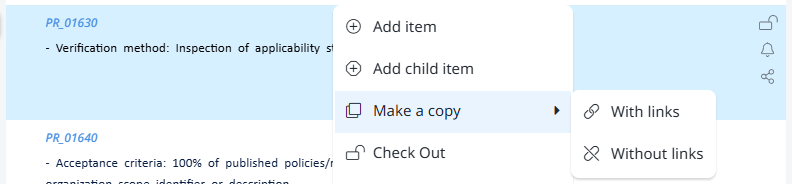
- Right-click the item in Document View or List View.
- Choose Make a copy from the context menu.
- Pick one of two options:
- With links — copies the item and its traceability links to whatever items the original was linked to.
- Without links — copies only the item content; no links are created.
The new item appears immediately below the original. It belongs to the same document and access partition. Visure generates a new code based on the document's prefix.
When to use which:
- With links — when you're creating a variant of an existing item that should maintain the same upstream and downstream traceability (e.g., a similar requirement that derives from the same parents and is verified by the same tests).
- Without links — when the new item is structurally similar but conceptually independent. You'll add new links manually.