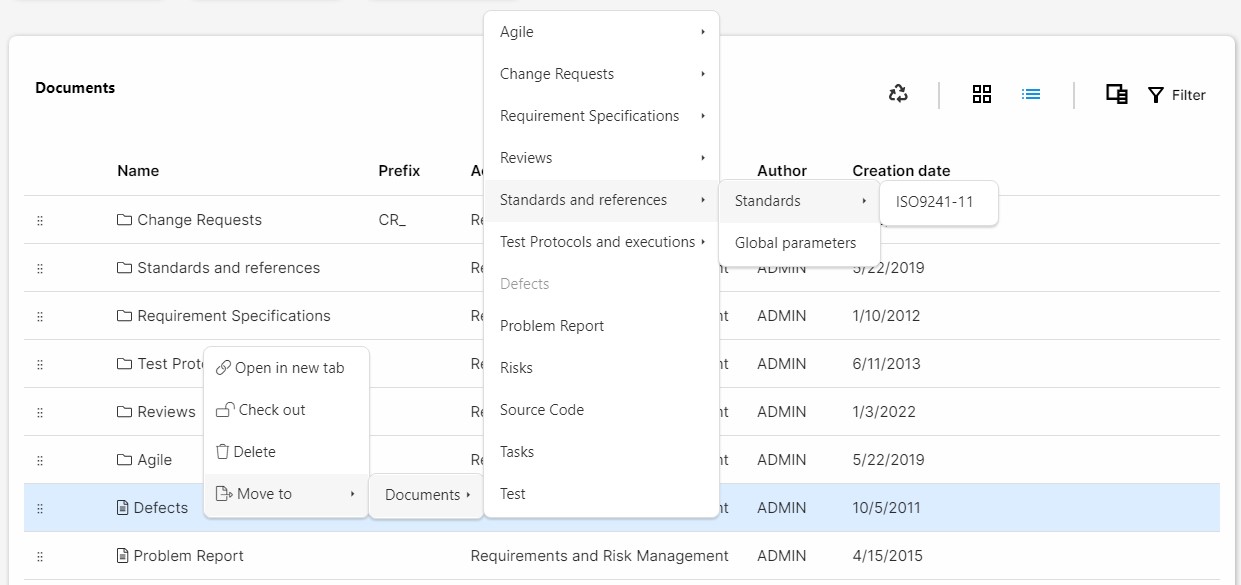
Rearranging documents
Users can rearrange folders and document by clicking on the selection icon () and drag and dropping them inside other folders or documents. If a document is dropped on top of another element, it will be automatically located inside that element it was dropped on top of.
This option is only available in the list view.
Alternatively, users can right-click and select the Move to option. This option will display the hierarchy of documents in the project and will allow the user to locate it anywhere. The document will be located inside the selected element. Therefore, if the user clicks on top of Component Requirements, the element will be moved inside this folder. If the user clicks on the first level Documents option, it will be displayed in the first level of hierarchy, without a parent folder.